





21 Oct 2026
Yes, you can let AI help with your book and still sound like yourself. Here’s how to use AI to write a book without losing your voice: give the tool small, dull jobs, and keep the stories, opinions, and final rewrite for yourself.
I’ve watched this play out more than once. An author pastes in a prompt, gets back a smooth, confident chapter, and feels huge relief. Then a friend reads it and says, “It’s good, but it doesn’t sound like you.” Ouch.

Can You Write a Book With AI and Still Sound Like Yourself?
Yes, as long as you’re the one steering and AI is just along for the ride. Your voice comes from the stories only you can tell, the opinions you’d argue about over dinner, and the odd way you explain things to a friend. No tool has any of that until you give it.
Take Daniel, a business consultant. He types “write chapter three about leadership” into a chatbot and gets something tidy. It’s also so generic that it could describe any manager at any company, and his clients can’t find him in it anywhere.
So he tries again. He sits down, talks through chapter three for about ten minutes, and records it. Then he asks the tool to chop the transcript into sections. Same software, completely different result, because every idea in it started with him.
Where Does AI Book Writing Actually Help?
AI book writing works best on structure and cleanup. It works worst on anything personal or anything a reader could fact check. Most AI writing tools for authors are decent at the first and shaky at the second.
I’d hand these over without losing sleep: title ideas when you’re stuck, a rough outline built from your messy notes, summaries of interview transcripts, and a first sweep for typos and repeated words. It’s also handy to ask the tool to quiz you about a chapter. Questions pull out details you forgot you knew. And if you’re staring at a blank page, these tips from the pros on pushing through writer’s block pair well with the interview trick.
The Authors Guild also publishes free AI best practices for authors, covering the ethical and legal side of using AI in writing. One important point is copyright: under current U.S. Copyright Office guidance, purely AI-generated material generally isn’t protected by copyright. However, human-written expression and sufficiently creative human contributions to a work may qualify for protection.
How to Use AI to Write a Book, Step by Step
I keep coming back to a three part routine. Give the tool your voice first, then small tasks, then rewrite everything yourself. Skip the first part and you’ll get the bland chapters you were trying to avoid.
How Do You Teach AI Your Voice?
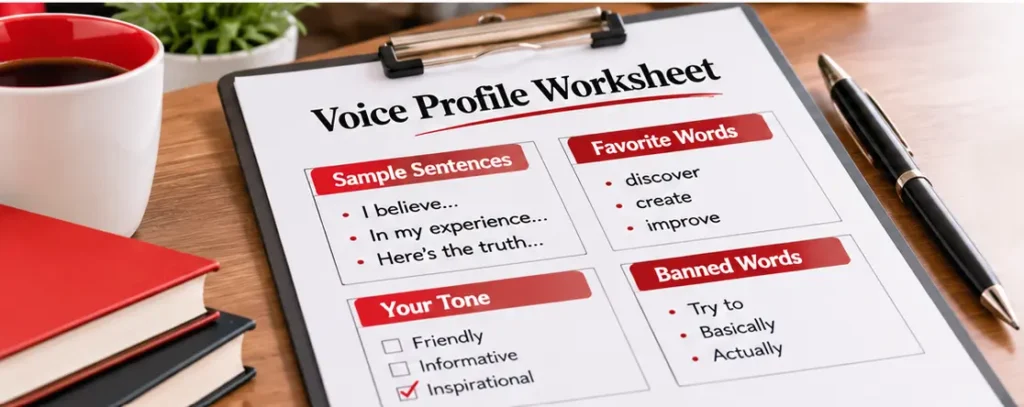
Pull together a few things you’ve already written or said, then boil them down to a short voice profile. If you only try one idea from this article, make it this one, since nothing else protects your author voice as well.
- Gather three to five samples. Old emails, blog posts, social posts, even a transcript of you rambling about your topic all work. Grab the ones that sound like you on a good day.
- Look at what you actually do. Do your sentences run short? Is there a phrase you lean on too much? Which words would never leave your mouth?
- Write the profile. One paragraph is plenty, something like “I use plain words, short sentences, and I usually open with a story.”
- Paste it in every session. The tool forgets, so remind it each time.
How to Use AI to Write a Book From Your Own Notes
Once the profile exists, hand the tool narrow jobs that start from your material. Please don’t ask for finished chapters.
- Build the outline. Send over your notes and ask for three ways to order the chapters. Take whichever one matches your gut feeling, then shuffle things around.
- Write the heart of each chapter yourself. The stories and opinions come from you, even if your first pass is messy.
- Ask for options, not answers. Request three ways to open a chapter, then rewrite your favorite in your own words.
- Let it interview you. Answer its questions the way you’d answer a curious friend.
- Rewrite every page. Nothing goes into the manuscript until it sounds like you said it.
That’s AI for authors in its proper place. A quick assistant, never the name on the cover.
How Do You Edit AI Generated Text So It Sounds Like You?
Read it aloud, swap the stock phrases for your own words, and drop in something only you would know. When you edit AI generated text, picture a well meaning stranger handing you their rough draft. You’re not just proofreading it, you’re taking it over.
First, read each paragraph out loud. Wherever you trip, rewrite. Then watch for filler such as “consistency is key.” Lines like that are everywhere, so replace them with something specific.
Next, add a detail nobody else has, like a name, a place, or a number from your own life. Cut the hedging too. These tools love “can often help” and “may sometimes,” so take a stand instead. Finally, check every fact against a real source.
Here’s how that played out for Marcus, a fitness coach. His AI draft said “Consistency is key to success.” He deleted that line and told the story of the winter he almost quit his 5 a.m. gym routine. The paragraph finally had a pulse.
AI book editing tools can still earn their keep near the end. They’re good at flagging typos and awkward lines, but they shouldn’t reshape your tone. For a human read, a professional book editing service can catch what software misses.
What Is the Difference Between AI-Assisted vs AI-Generated Content on KDP?
Amazon splits them into two groups. If AI created the text, images, or translations, KDP wants to know. If AI only helped you polish your own work, you don’t have to disclose it. Getting AI-assisted vs AI-generated content right protects your book and your account.
According to Amazon’s KDP content guidelines, you inform KDP about AI-generated content when you publish a new book or edit and republish an existing one. If you wrote the work yourself and used AI tools to edit, refine, or error check it, Amazon calls that AI-assisted. Using AI to brainstorm ideas, then writing the text yourself, also counts as AI-assisted. Either way, you’re responsible for making sure everything follows KDP’s guidelines.
Two quick examples. Say an AI tool wrote a chapter and you edited it heavily. Amazon still treats that as AI-generated, even with substantial edits afterward. Now say you wrote the chapter and just ran it past a grammar checker. That’s AI-assisted.
One more thing before you fill in the KDP AI disclosure questions: ask your book cover designer whether any AI images were used. And if you still can’t tell where you land, check the current guidelines or ask KDP support before you publish. The wording can change. If you’d like help with the KDP setup itself, here’s how a book publishing service can take that off your plate.
AI vs Ghostwriter: Which One Fits Your Book?
It comes down to three things: your time, your budget, and how much of the writing you want to do. The AI vs ghostwriter question isn’t a strict either-or, and plenty of authors end up using both. They each fix something different.
AI is quick for outlines, rough drafts, and cleanup, but the voice, the stories, and the fact checking still come from you. A ghostwriter interviews you, shapes your ideas, and writes them in your voice, which helps if you’re short on time or the blank page freezes you. If you’re writing about your expertise, a non-fiction ghostwriter is often the closest fit.
An editor shows up once there’s a draft. They tighten structure, clarity, and tone, no matter whether the draft came from you, a tool, or both. Here’s how I’d decide: if finding time is your biggest problem, a ghostwriter can save you months. If polishing is the problem, an editor and a few AI tools might be plenty. You can see the full range of book writing services to compare.
What Should You Do Next?
Start with a single chapter this week. You’ll learn more from ten minutes of trying how to use AI to write a book than from another hour of reading about it.
- Find three samples of your own writing or talking.
- Write a one paragraph voice profile.
- Record yourself explaining one chapter out loud.
- Have AI turn the transcript into an outline, then write the draft and rewrite it yourself.
- Before you publish, go back over your KDP AI disclosure answers.
Already thinking past the draft? This guide on how to launch a book walks through a six month plan. And if you’d rather have a pro in your corner, you can contact our team to plan the book, keep your voice intact, and get it ready for KDP.